26 December, 2019

Azure Migration Planning Step by Step

Azure Migration Planning Step by Step


The best way to do the azure migration is to use the most popular azure migration framework. Assess your current systems with Azure Migrate, and migrate them with Azure Site Recovery and Azure Database Migration Service.

Azure Migration Framework

As a path for migration, each stage focuses on a particular aspect of ensuring the success of a migration.
  1. Assess
  2. Migrate
  3. Optimize and 
  4. Monitor

Step 1: Assess

Identify the servers, applications, and services that are in scope for migration. After that involve your IT and business teams that work with those services. By Involving these teams in as early as possible in the migration process, you ensure that they can provide guidance, feedback, and support for the migration. Every application must be fully investigated before any work takes place.

There are multiple migration options:

Rehost:

While using this option you need to recreate your existing infrastructure in Azure. Choosing this approach has the least impact because it requires minimal changes. It typically involves moving virtual machines from your data center to virtual machines on Azure.

Refactor:

While using this option you need to move services running on virtual machines to platform-as-a-service (PaaS) services. This approach can reduce operational requirements, improve release agility, and keep your costs low. Small enhancements to run more efficiently in the cloud can have large impacts on performance.

Rearchitect:

While using this option you need to you might have to rearchitect some systems so that they can be migrated. Other apps could be changed to become cloud-native or to take advantage of new approaches to software, such as containers or microservices.

Rebuild: 

You might need to rebuild software if the cost to rearchitect it is more than that of starting from scratch.

Replace:

You may find that third-party applications could completely replace your custom applications. Evaluate software-as-a-service (SaaS) options that can be used to replace existing applications.

Involve Stakeholders

Applications are used by specific sections of the business. Involving these people in the planning stage increases the chance of a successful migration. 

Estimate Cost Savings

A component of the business's plan to migrate to Azure could be to abbreviate costs. Utilize the Azure Total Cost of Ownership (TCO) Calculator to estimate the project cost.

Tools to Migrate Data and Database to Azure Databases

Azure Database Migration Service

DMS is a fully managed service designed to enable seamless migrations from multiple database sources to Azure Data platforms with minimal downtime. Recommend for the large databases and size.

Azure Data Box

The best and cheapest way to moves large datasets of either offline or online data to Azure.

Data Migration Assistant

Check SQL databases for compatibility, and then migrates the schema and data to Azure. Its recommended for the small database and data size.

Data Migration Tool

Migrates existing databases to Azure Cosmos DB. Azure Cosmos DB Data Migration tool, which can import data from different sources into Azure Cosmos containers and tables. Data can be imported from JSON files, CSV files, SQL, MongoDB, Azure Table storage, Amazon DynamoDB, and even Azure Cosmos DB SQL API collections. Also, the Data Migration tool can be used to migrating from a single partition collection to a multi-partition collection for the SQL API.

Step 2: Migration

Deploy Targeted Cloud Infrastructure

As your servers, application, databases, and services have been defined and decided now its time to provision the required infrastructure for your destination systems and services on Azure to migrate to.  The two tools you'll use to do the migration, Azure Site Recovery, and the Azure Database Migration Service, will create the required Azure resources for you.

Migrate Workloads

It's recommended to start with a small migration instead of migrating a large, business-critical workload. Using this approach you will become familiar with the tools, processes, and procedures for migration. It can reduce the risk of issues when you migrate to larger workloads. 
Web Applications Migrations, the high-level steps are:
  • Get ready the source (on-premises Server) and target (Azure) environments.
  • Set up and start the replication between the two.
  • Test that the replication has worked.
  • Failover from the source servers to Azure.
The database migrations, the high-level steps are:
  • Assess your on-premises databases.
  • Migrate the schemas.
  • Create and run an Azure Database Migration Service project to move the data.
  • Monitor the migration.

Decommission of On-premises Infra

After all migrated workloads have been tested and verified as successfully migrated to Azure, you can decommission all your on-premises systems.

Step 3: Optimize


Analyze running costs


Use Azure Cost Management to start analyzing the Azure costs of your workload. 

Credit to MSDN

Step 4: Optimize


Incorporate Health and Performance Monitoring


You can use Azure Monitor to capture health and performance information from Azure VMs if you install a Log Analytics agent. You can install the agent on machines running either Windows or Linux, and you can then set up alerting and reporting. Here your DevOps team would be quite helpful. 


Alerts can be set up on a range of data sources, for your application such as:

  • Specific metric values like CPU usage.
  • Specific text in log files.
  • Health metrics.
  • An Autoscale metric.

17 December, 2019

Azure Security Documentation and Compliance Offerings

Azure Security Documentation and Compliance Offerings


The following list provides details about some of the compliance offerings available.

  • Criminal Justice Information Services (CJIS). Any US state or local agency that wants to access the FBI's CJIS database is required to adhere to the CJIS Security Policy. Azure is the only major cloud provider that contractually commits to conformance with the CJIS Security Policy, which commits Microsoft to adhere to the same requirements that law enforcement and public safety entities must meet.
  • Cloud Security Alliance (CSA) STAR Certification. Azure, Intune, and Microsoft Power BI have obtained STAR Certification, which involves a rigorous independent third-party assessment of a cloud provider's security posture. This STAR certification is based on achieving ISO/IEC 27001 certification and meeting criteria specified in the Cloud Controls Matrix (CCM). This certification demonstrates that a cloud service provider:
    • Conforms to the applicable requirements of ISO/IEC 27001.
    • Has addressed issues critical to cloud security as outlined in the CCM.
    • Has been assessed against the STAR Capability Maturity Model for the management of activities in CCM control areas.
  • General Data Protection Regulation (GDPR). As of May 25, 2018, a European privacy law — GDPR — is in effect. GDPR imposes new rules on companies, government agencies, non-profits, and other organizations that offer goods and services to people in the European Union (EU), or that collect and analyze data tied to EU residents. The GDPR applies no matter where you are located.
  • EU Model Clauses. Microsoft offers customers EU Standard Contractual Clauses that provide contractual guarantees around transfers of personal data outside of the EU. Microsoft is the first company to receive joint approval from the EU's Article 29 Working Party that the contractual privacy protections Azure delivers to its enterprise cloud customers meet current EU standards for international transfers of data. This ensures that Azure customers can use Microsoft services to move data freely through Microsoft's cloud from Europe to the rest of the world.
  • Health Insurance Portability and Accountability Act (HIPAA). HIPAA is a US federal law that regulates patient Protected Health Information (PHI). Azure offers customers a HIPAA Business Associate Agreement (BAA), stipulating adherence to certain security and privacy provisions in HIPAA and the Health Information Technology for Economic and Clinical Health (HITECH) Act. To assist customers in their individual compliance efforts, Microsoft offers a BAA to Azure customers as a contract addendum.
  • International Organization for Standardization (ISO) and the International Electrotechnical Commission (IEC) 27018. Microsoft is the first cloud provider to have adopted the ISO/IEC 27018 code of practice, covering the processing of personal information by cloud service providers.
  • Multi-Tier Cloud Security (MTCS) Singapore. After rigorous assessments conducted by the MTCS Certification Body, Microsoft cloud services received MTCS 584:2013 certification across all three service classifications:
    • Infrastructure as a Service (IaaS)
    • Platform as a Service (PaaS)
    • Software as a Service (SaaS)
    Microsoft was the first global cloud solution provider (CSP) to receive this certification across all three classifications.
  • Service Organization Controls (SOC) 1, 2, and 3. Microsoft-covered cloud services are audited at least annually against the SOC report framework by independent third-party auditors. The Microsoft cloud services audit covers controls for data security, availability, processing integrity, and confidentiality as applicable to in-scope trust principles for each service.
  • National Institute of Standards and Technology (NIST) Cybersecurity Framework (CSF). NIST CSF is a voluntary framework that consists of standards, guidelines, and best practices to manage cybersecurity-related risks. Microsoft cloud services have undergone independent, third-party Federal Risk and Authorization Management Program (FedRAMP) Moderate and High Baseline audits, and are certified according to the FedRAMP standards. Additionally, through a validated assessment performed by the Health Information Trust Alliance (HITRUST), a leading security and privacy standards development and accreditation organization, Office 365 is certified to the objectives specified in the NIST CSF.
  • UK Government G-CloudThe UK Government G-Cloud is a cloud computing certification for services used by government entities in the United Kingdom. Azure has received official accreditation from the UK Government Pan Government Accreditor.

What is cloud computing?

What is cloud computing?


Cloud computing is a mechanism for renting resources, like storage space, CPU cycles, on another company's computers. You only pay for what you use. The company providing these services is referred to as a cloud provider. For example, providers are Microsoft, Amazon, and Google.

 The cloud provider is responsible for the physical hardware required to execute your work, and for keeping it up-to-date.

Compute power - such as Linux servers or web applications
Storage - such as files and databases
Networking - such as secure connections between the cloud provider and your company
Analytics - such as visualizing telemetry and performance data


What are the containers?

 Containers provide a consistent, isolated execution environment for applications. They're similar to Virtual Machines except they don't require a guest operating system. Instead, the application and all its dependencies are packaged into a "container" and then a standard runtime environment is used to execute the app. This allows the container to start up in just a few seconds because there's no OS to boot and initialize. You only need the app to launch.


Cloud computing vs Containers vs Serverless Computing


Below is a diagram comparing the three compute approaches we've covered.

Cloud computing vs Containers vs Serverless Computing

16 December, 2019

Best Way To Update Storage Account SKU Plan Example

How to Update Existing Storage Account SKU Plan?

​The updates operation allow updating
  • The SKU, 
  • Encryption, 
  • Access tier, 
  •  Tags 
  •  It can also be used to map the account to a custom domain
Only one custom domain is supported per storage account. The change of the custom domain is not supported. In order to replace an old custom domain, the old value must be cleared/unregistered before a new value can be set. 


PowerShell: Update Storage Account SKU Example

Set-AzureRmStorageAccount -ResourceGroupName "YourResourceGroup" -AccountName "YourSorageAccounNAME" -Type "Standard_LRS"

Visit MSDN For More Powershell Commands


Azure API: Update Storage Account SKU Example


PATCH https://management.azure.com/subscriptions/{subscriptionId}/resourceGroups/{resourceGroupName}/providers/Microsoft.Storage/storageAccounts/{accountName}?api-version=2019-06-01

Visit MSDN for the latest updates

https://docs.microsoft.com/en-us/rest/api/storagerp/storageaccounts/update


12 December, 2019

ASP.NET Core Blazor Advantage and Disadvantage

ASP.NET Core Blazor Advantage and Disadvantage


Advantage of The Blazor WebAssembly Hosting Model


  • There's no .NET server-side dependency. 
  • The app is fully functioning after downloading it to the client.
  • Client resources and capabilities are fully utilized.
  • Work is offloaded from the server to the client.
  •  Serverless deployment scenarios are possible, ie. you can use  Azure Storage Account and CDN to host your application


A disadvantage of Blazor WebAssembly Hosting:

  • The app is restricted to the capabilities of the browser.
  • Client hardware and software should be capable to provide the environment to run the application (for example, WebAssembly support is required)
  • App size is larger, and apps take longer to load.

11 December, 2019

Azure Data Load (ETL) Process using Azure Functions Step by Step Example

Data Load (ETL) Process using Azure Functions


Azure Functions 

are serverless and are a great solution for processing data, integrating systems, working with the internet-of-things (IoT), and building simple APIs and microservices. Consider Functions for tasks like image or order processing, file maintenance, or for any tasks that you want to run on a schedule.

Here we are talking about ETL process implementation using Azure Functions, even though Azure Data Factory is out there but if you are a c# developer you will love it. You can leverage all the benefits of the App Service Plan and/or Consumption Plan(Pay As you Go) along with Event-Driven Process and Programming Model

Azure Durable Function

Durable Function is an extension of Azure Function that lets you write stateful functions in a serverless compute environment. It allows you to define stateful workflows by writing orchestrator functions and stateful entities by writing entity/Activity functions using the Azure Functions programming model. All other things like state management, checkpoints, and restarts for you, will be taken care of by azure durable function engine and allowing you to focus on your business logic.

The primary requirement is the reader should be familiar  with Azure function and durable functions

Business Requirement

 We have CSV file dropped into the azure blob storage/container and that file should be process and data saved into the Azure SQL Server.

Design and Architecture

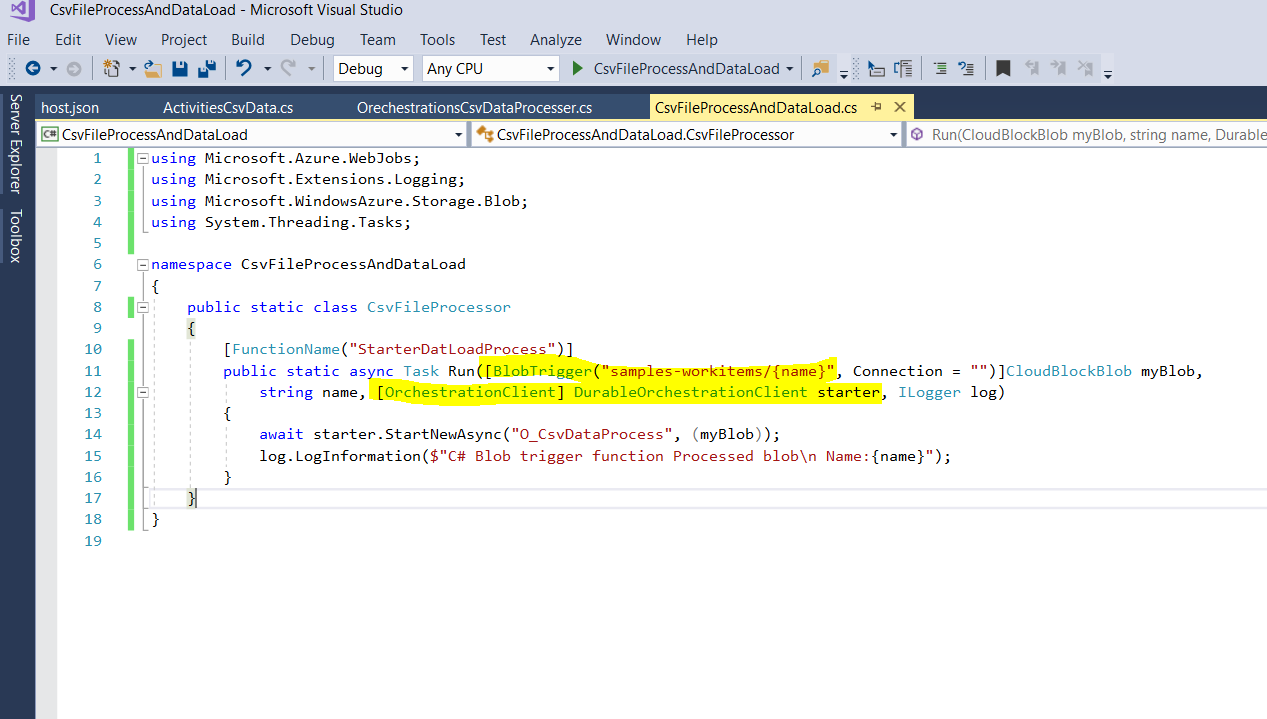
  • Azure Function: It's a blob trigger function and starter for the data load process.
  • Azure Durable Functions - Orchestrator: It's an orchestrator function that will manage the workflow/data flow activities function and all the executions 
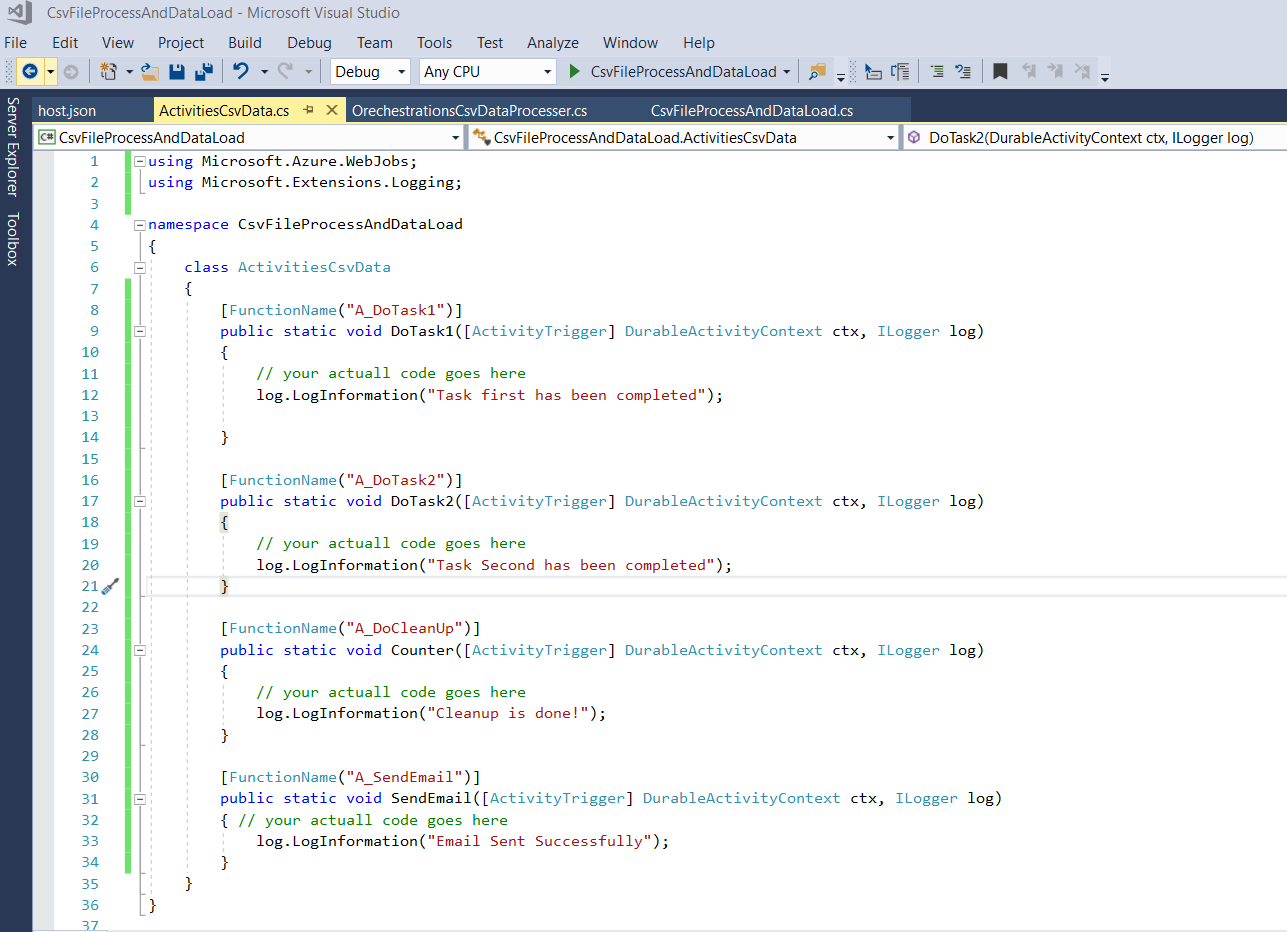
  • Azure Durable Functions - Activity: An azure function that will actually process the CSV data and will insert into the azure SQL database
  • Azure SQL Server: will be in used to keep processed data
  • SendGrid: will be used to send emails and acknowledgment on process completion
  • Application Insights: can be used to logging the exception event etc..
work flow

Development Environment Setup:

  1.  Visit MSDN for the step by step example  here is a link
  2.  Required NuGet package Microsoft.Azure.WebJobs.Extensions.DurableTask

Code and Example : 

Here is a list of code screenshots
Start Function: its a blob trigger azure function that will execute automatically once any CSV file will be dropped into the container "samples-workitems"

Start Function


Orchestrator Function : 

it will manage the life cycle of data workflow 
Orchestrator Function


Activity Functions
perform actual data manipulation and communication with the database.

Activity Functions


Solutions and NuGet pkg:
Solutions and NuGet pkg

Bonus Points: 

  1. Use Cunsputions Plans only if you are sure that you function execution time will no exceed 10minutes limit
  2. Use App Service Plan if need to configure vnet andother securtity and if your function will need more than 10 minutes to complete the task just you need to configure function time out in host.json
  3. Visit for more Application Patterns 


09 December, 2019

Azure Logic Apps Send Email Using Send Grid Step by Step Example

Azure Logic Apps Send Email Using Send Grid Step by Step


Step 1- Create Send Grid Account

send grid pricing tier
  • Create a SendGrid Account https://sendgrid.com/
  • Login and Generate Sendgrid Key and keep it safe that will be used further to send emails
  • You can use Free service. it's enough for the demo purpose


Step 2- Logic App Design

  • Go to Resources and Create Logic App Named "EmailDemo"

logic apps

  • Go To Newly Created Rosoure Named "EmailDemo" and Select a Trigger "Recurrence", You can choose according to your needs like HTTP, etc. Note* Without trigger you can not insert new steps or Actions

  • Click on Change Connection and add Send Grid Key 

  • Click on Create and Save Button on the Top.
As we have recurrence so it will trigger according to our setup(every 3 months) so just for the test click on "RUN" button 
Finally, you should get an email like below one: