19 July, 2022

how to choose best azure load balancer for you


Service categorizations

Azure load balancing services can be categorized along two dimensions: global versus regional, and HTTP(S) versus non-HTTP(S).

Global versus regional

  • Global load-balancing services distribute traffic across regional backends, clouds, or hybrid on-premises services. These services route end-user traffic to the closest available backend. They also react to changes in service reliability or performance, in order to maximize availability and performance. You can think of them as systems that load balance between application stamps, endpoints, or scale units hosted across different regions/geographies.

  • Regional load-balancing services distribute traffic within virtual networks across virtual machines (VMs) or zonal and zone-redundant service endpoints within a region. You can think of them as systems that load balance between VMs, containers, or clusters within a region in a virtual network.

HTTP(S) versus non-HTTP(S)

  • HTTP(S) load-balancing services are Layer 7 load balancers that only accept HTTP(S) traffic. They are intended for web applications or other HTTP(S) endpoints. They include features such as SSL offload, web application firewall, path-based load balancing, and session affinity.

  • Non-HTTP/S load-balancing services can handle non-HTTP(S) traffic and are recommended for non-web workloads.

The following table summarizes the Azure load balancing services by these categories:

ServiceGlobal/regionalRecommended traffic
Azure Front DoorGlobalHTTP(S)
Traffic ManagerGlobalnon-HTTP(S)
Application GatewayRegionalHTTP(S)
Azure Load BalancerRegionalnon-HTTP(S)

Azure load balancing services

Here are the main load-balancing services currently available in Azure:

Front Door is an application delivery network that provides global load balancing and site acceleration services for web applications. It offers Layer 7 capabilities for your application like SSL offload, path-based routing, fast failover, caching, etc. to improve the performance and high availability of your applications.

 Note

At this time, Azure Front Door does not support Web Sockets.

Traffic Manager is a DNS-based traffic load balancer that enables you to distribute traffic optimally to services across global Azure regions while providing high availability and responsiveness. Because Traffic Manager is a DNS-based load-balancing service, it loads balances only at the domain level. For that reason, it can't fail over as quickly as Front Door, because of common challenges around DNS caching and systems not honoring DNS TTLs.

Application Gateway provides an application delivery controller (ADC) as a service, offering various Layer 7 load-balancing capabilities. Use it to optimize web farm productivity by offloading CPU-intensive SSL termination to the gateway.

Azure Load Balancer is a high-performance, ultra-low-latency Layer 4 load-balancing service (inbound and outbound) for all UDP and TCP protocols. It is built to handle millions of requests per second while ensuring your solution is highly available. Azure Load Balancer is zone-redundant, ensuring high availability across Availability Zones.


Reference architecture examples

The following table lists various architecture reference articles based on the load-balancing services used as a solution.

Service(s)

Article

Description

Load Balancer

Load balance virtual machines (VMs) across availability zones

Load balance VMs across availability zones helps to protect your apps and data from an unlikely failure or loss of an entire data center. With zone redundancy, one or more availability zones can fail and the data path survives as long as one zone in the region remains healthy.

Front Door

Sharing location in real-time using low-cost serverless Azure services

Use Azure Front Door to provide higher availability for your applications than deploying to a single region. If a regional outage affects the primary region, you can use Front Door to fail over to the secondary region.

Application Gateway

IaaS: Web application with relational database

Learn how to use resources spread across multiple zones to provide high availability (HA) architecture for hosting an Infrastructure as a Service (IaaS) web application and SQL Server database.

Traffic Manager

Multi-tier web application built for high availability and disaster recovery

Deploy resilient multi-tier applications built for high availability and disaster recovery. If the primary region becomes unavailable, Traffic Manager fails over to the secondary region.

Azure Front Door + Application Gateway

Multitenant SaaS on Azure

Use a multi-tenant solution that includes a combination of Front Door and Application Gateway. Front Door helps load balance traffic across regions and Application Gateway routes and load-balances traffic internally in the application to the various services that satisfy client business needs.

Traffic Manager + Load Balancer

Multi-region N-tier application

A multi-region N-tier application that uses Traffic Manager to route incoming requests to a primary region and if that region becomes unavailable, Traffic Manager fails over to the secondary region.

Traffic Manager + Application Gateway

Multi-region load balancing with Traffic Manager and Application Gateway

Learn how to serve web workloads and deploy resilient multi-tier applications in multiple Azure regions, in order to achieve high availability and a robust disaster recovery infrastructure.

Decision tree for load balancing in Azure

When selecting the load-balancing options, here are some factors that are considered when you select the Help me choose default tab in Azure load balancing:

  • Traffic type. Is it a web (HTTP/HTTPS) application? Is it public facing or a private application?
  • Global versus. regional. Do you need to load balance VMs or containers within a virtual network, or load balance scale unit/deployments across regions, or both?
  • Availability. What is the service SLA?
  • Cost. See Azure pricing. In addition to the cost of the service itself, consider the cost of the operation for managing a solution built on that service.
  • Features and limits. What are the overall limitations of each service? See Service limits.

The following flowchart will help you to choose a load-balancing solution for your application. The flowchart guides you through a set of key decision criteria to reach a recommendation.

Treat this flowchart as a starting point. Every application has unique requirements, so use the recommendation as a starting point. Then perform a more detailed evaluation.

If your application consists of multiple workloads, evaluate each workload separately. A complete solution may incorporate two or more load-balancing solutions.
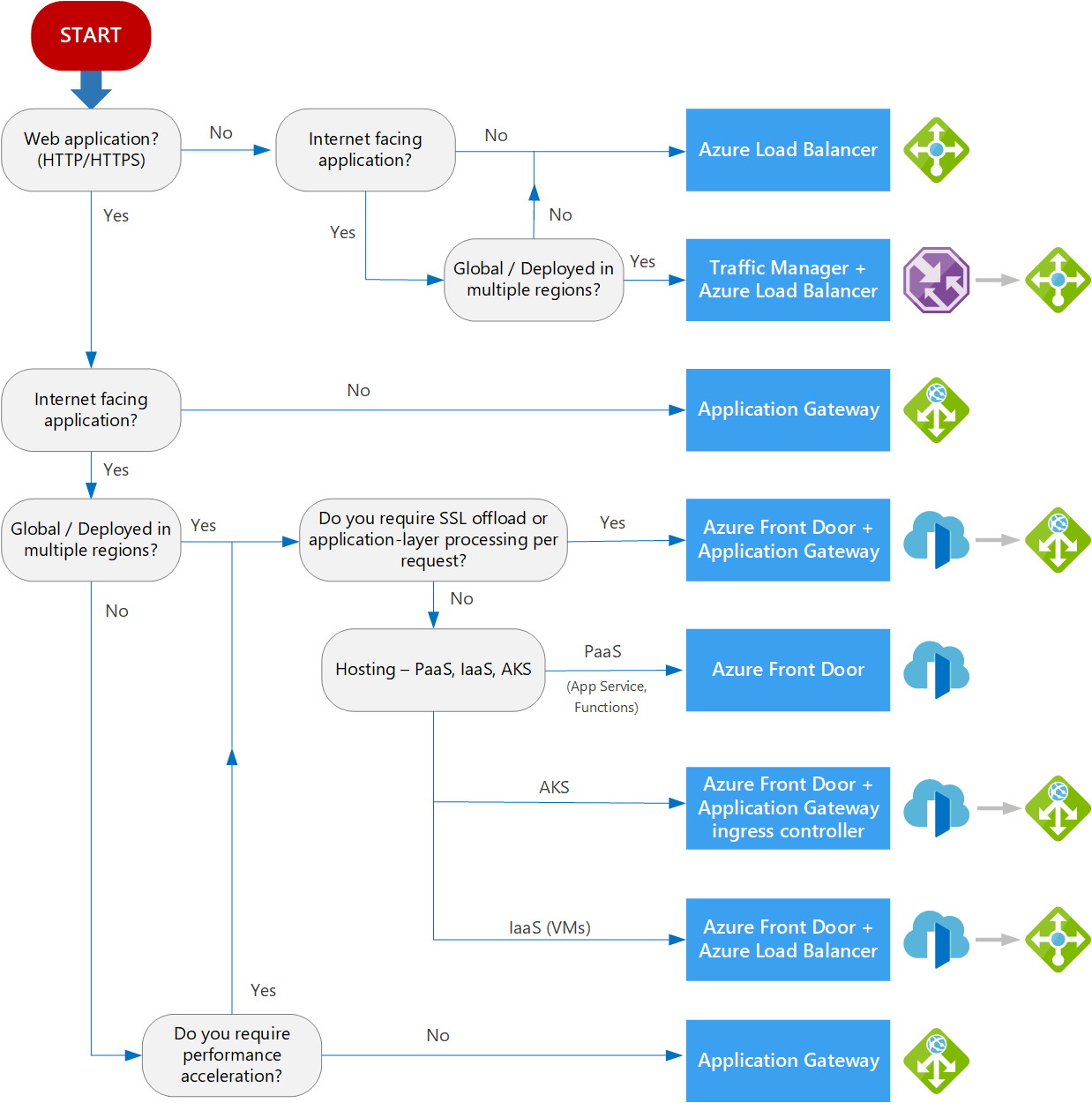
Decision tree for load balancing in Azure

Image

Source: https://docs.microsoft.com/en-us/azure/

Definitions

  • Internet-facing. Applications that are publicly accessible from the internet. As a best practice, application owners apply restrictive access policies or protect the application by setting up offerings like web application firewall and DDoS protection.

  • Global. End users or clients are located beyond a small geographical area. For example, users across multiple continents, across countries/regions within a continent, or even across numerous metropolitan areas within a larger country/region.

  • PaaS. Platform as a service (PaaS) services provides a managed hosting environment, where you can deploy your application without needing to manage VMs or networking resources. In this case, PaaS refers to services that provide integrated load balancing within a region. See Choosing a compute service – Scalability.

  • AKS. Azure Kubernetes Service enables you to deploy and manage containerized applications. AKS provides serverless Kubernetes, an integrated continuous integration and continuous delivery (CI/CD) experience, and enterprise-grade security and governance. For more information about our AKS architectural resources, see Azure Kubernetes Service (AKS) architecture design.

  • IaaS. Infrastructure as a service (IaaS) is a computing option where you provision the VMs that you need, along with associated network and storage components. IaaS applications require internal load balancing within a virtual network, using Azure Load Balancer.

  • Application-layer processing refers to special routing within a virtual network. For example, path-based routing within the virtual network across VMs or virtual machine scale sets. For more information, see When should we deploy an Application Gateway behind Front Door?.

16 July, 2022

Which is not characteristics of private cloud?

What is a private cloud? 

A private cloud comprises cloud computing resources that are only used by one company or organization. The private cloud can be physically located in your company's on-site data center or hosted by a third-party service provider. However, in a private cloud, the services and infrastructure are always kept on a private network, and the hardware and software are exclusively dedicated to your organization.

In this fashion, a private cloud can make it easier for a company to tailor its resources to meet specific IT needs. Government agencies, financial institutions, and other mid- to large-size organizations seeking enhanced environmental control frequently use private clouds.

Features & Components of Private Cloud

More adaptability: your company can tailor its cloud environment to meet specific business requirements.

More control: because resources are not shared with others, greater control and privacy is possible.

More scalability: When compared to on-premises infrastructure, private clouds frequently provide more scalability.

Shared: Workloads are multiplexed, capacity is pooled

Metered consumption: Ability to pay for use with no commitment

Higher Security And Privacy: Private cloud offers higher security than public cloud services. Due to the limited access, Private Cloud provides more Security services.


Which are not characteristics of the private cloud?

  • Users can self-provision
  • Located on-premises
  • Elastic and scalable
  • Pay for only the resources you use 

30 June, 2022

Connect to Azure SQL database using managed identity C# .Net 6.0

Connect to Azure SQL database using managed identity C# .Net 6.0

Let's discuss the connecting .net 6.0 c# application to azure SQL serve using MSI

.NET 6.0 applications are more flexible and require less work than other.NET frameworks, such as.NET Core 3.1,.NET 4.8, and so on.

Connect  .Net Core 3.1 or the Lower version Application to azure SQL

  you will be using the following package

Install-Package Azure.Identity

Install-Package System.Data.SqlClient


Connect .Net 6.0 Application to Azure SQL: 

you will be using only following the NuGet package with the new connection string

dotnet add package Microsoft.Data.SqlClient


 if you are using system-assigned identity MSI then uses the following connections string and code.(Local Machine)

using Microsoft.Data.SqlClient;

...

// Uncomment one of the two lines depending on the identity type    
SqlConnection connection = new SqlConnection(
    "Server=tcp:<server-name>.database.windows.net;Database=<database-name>;
Authentication=Active Directory Default;TrustServerCertificate=True"
    ); // system-assigned identity
// Open the SQL connection
connection.Open();


If you are using a user-assigned identity then use the following connecting string or code (Local Machine)


using Microsoft.Data.SqlClient;

...

SqlConnection connection = new SqlConnection(
    "Server=tcp:<server-name>.database.windows.net;Database=<database-name>;
Authentication=Active Directory Default;
User Id=<client-id-of-user-assigned-identity>;TrustServerCertificate=True");
    // user-assigned identity

// Open the SQL connection
connection.Open();

Set up your dev environment and Visual Studio

  • Visual Studio for Windows is integrated with Azure AD authentication. To enable development and debugging in Visual Studio, add your Azure AD user in Visual Studio by selecting File > Account Settings from the menu, and selecting Sign-in or Add.
  • To set the Azure AD user for Azure service authentication, select Tools > Options from the menu, then select Azure Service Authentication > Account Selection. Select the Azure AD user you added and select OK


To run your application on Azure App Service, you may need to use the connection string below


Since Microsoft.Data.SqlClient 2.1.0, the driver supports authentication to Azure SQL Database, and Azure SQL Managed Instance by acquiring access tokens via managed identity. To use this authentication, specify either Active Directory Managed Identity or Active Directory MSI in the connection string, and no password is required. You can't set the Credential property of SqlConnection in this mode either.

Below connection string for system-assigned identity :

// For system-assigned managed identity
// Use your own server and database.
string ConnectionString1 = @"Server=demo.database.windows.net;
Authentication=Active Directory Managed Identity; Database=employeedb";

using (SqlConnection conn = new SqlConnection(ConnectionString1)) {
    conn.Open();
}

string ConnectionString2 = @"Server=demo.database.windows.net;
Authentication=Active Directory MSI; Database=employeedb";

using (SqlConnection conn = new SqlConnection(ConnectionString2)) {
    conn.Open();
}

For the other pre-steps of SQL server configuration, see here

28 June, 2022

Microsoft Graph API upload large file to SharePoint

How to Upload a file to SharePoint using Microsoft Graph API - C#/.Net?


To make it easier to upload large files, a number of entities in Microsoft Graph support plus some extra file uploads. Instead of attempting to upload the entire file in a single request, the file is divided into smaller pieces and a single request is used to upload a single slice. To make this process easier, the Microsoft Graph SDKs include a large file upload task that handles the uploading of the slices.


Azur AD Setup:

 you need to complete the following steps to configure the azure ad.

Step - 1: Register an application with the Microsoft identity platform


  1. Sign in to the Azure portal.

  2. If you have access to multiple tenants, use the Directories + subscriptions filter in the top menu to switch to the tenant in which you want to register the application.

  3. Search for and select Azure Active Directory.

  4. Under Manage, select App registrations > New registration.

  5. Enter a Display Name for your application. Users of your application might see the display name when they use the app, for example during sign-in. You can change the display name at any time and multiple app registrations can share the same name. The app registration's automatically generated Application (client) ID, not its display name, uniquely identifies your app within the identity platform.

  6.  see more here https://docs.microsoft.com/en-us/azure/active-directory/develop/quickstart-register-app

Step 2- Grand required permission to App

One of the following permissions is required to call this API. To learn more, including how to choose permissions, see Permissions.

you must have the below-highlighted permissions granted with Admin Consent 

Permission typePermissions (from least to most privileged)
Delegated (work or school account)Files.ReadWrite, Files.ReadWrite.All, Sites.ReadWrite.All
Delegated (personal Microsoft account)Files.ReadWrite, Files.ReadWrite.All
ApplicationFiles.ReadWrite.All, Sites.ReadWrite.All


Step-3:  Create secrete and save it (make sure to keep it secure)

When receiving tokens at a web addressable location, confidential applications can use credentials to identify themselves to the authentication service (using an HTTPS scheme). We recommend using a certificate (rather than a client secret) as a credential for greater assurance.

Create secrete and save it (make sure to keep it secure)

Step-4:  Get Client Id and Tenant Id

just get it and save it somewhere that will be later used in c# code.

Get Client Id and Tenant Id


C# Code  Setup

Step-1: Need to install the following NuGet pkg

  • Azure.Identity
  • Microsoft.Graph

Need to install the following NuGet pkg

Step-2:  Configuration setup

add the following configuration in the appsettings.json, but replace it with your own values that took in from the azure ad app.

"GraphAPISetting": {
  "ClientId": "d956647c-xxxx-xxxx-843b-56f0c7db967a",
  "ClientSecret": "VVe8Q~6Sk~xxxxxxxxqACB7xzxtZ0NEc2n",
  "TenantId": "33f294fc-00af-423d-XXXX-703cXXXXe3ed" 
}


Step-4: Finally C# code

private ClientCredentialProvider _SetAuthToken()
{

//_config - use microsoft configuration, dependecy injection.

   var _tenantId = _config["GraphAPISetting:TenantId"];
    var _clientId = _config["GraphAPISetting:ClientId"];
    var  _clientSecret = _config["GraphAPISetting:ClientSecret"];
    IConfidentialClientApplication confidentialClientApplication =
ConfidentialClientApplicationBuilder
        .Create(_clientId)
        .WithTenantId(_tenantId)
        .WithClientSecret(_clientSecret)

        .Build();
    return new ClientCredentialProvider(confidentialClientApplication);
}

public async Task<void> Upload()
{
   
    string site = "<YOUR DOMAIN, REPLACE HERE>.sharepoint.com";
    string relativePath = "/sites/<YOUR SITE, REPLACE HERE>";

var   _authProvider = _SetAuthToken();

    GraphServiceClient graphClient = new GraphServiceClient(_authProvider);

    Site s = await graphClient
        .Sites[site]
        .SiteWithPath(relativePath)
        .Request()
        .GetAsync();


    using (var fileStream =
        System
        .IO
        .File
        .OpenRead(
            @"myfile.txt"
        ))
    {
        var uploadSession = await graphClient
            .Sites[s.Id]
            .Drive
            .Root
            .ItemWithPath("sometext-1.txt")
            .CreateUploadSession()
            .Request()
            .PostAsync();

        // Max slice size must be a multiple of 320 KiB
        int maxSliceSize = 320 * 1024;
        var fileUploadTask =
            new LargeFileUploadTask<DriveItem>(uploadSession, fileStream,
maxSliceSize);

        var totalLength = fileStream.Length;
        // Create a callback that is invoked after each slice is uploaded
        IProgress<long> progress = new Progress<long>(prog => { });
        try
        {   // Upload the file
            var uploadResult = await fileUploadTask.UploadAsync(progress);

            //Console.WriteLine(uploadResult.UploadSucceeded ?
            //    $"Upload complete, item ID: {uploadResult.ItemResponse.Id}" :
            //    "Upload failed");
        }
        catch (ServiceException ex)
        {
            //Console.WriteLine($"Error uploading: {ex.ToString()}");
        }
    }
}


Final Output

 you will find that our text has been uploaded successfully.

Final Output


Some useful reference 

https://developer.microsoft.com/en-us/graph/graph-explorer

https://docs.microsoft.com/en-us/graph/api/drive-get?view=graph-rest-1.0&tabs=csharp

23 June, 2022

azure function error unknown argument --port

How to run Azure Function app on a different port in Visual Studio

or 

azure function error unknown argument --port


How to Fix it?

  • Update Project Properties -> Debug to following
  • put the following command  "host start --port 7071 --pause-on-error"


host start --port 7071 --pause-on-error


Finally, it works 


flutter/Android WebView not loading an HTTPS or http URL


flutter/Android WebView not loading an HTTPS or http  URL

flutter/Android WebView not loading an HTTPS or http  URL


You can use the WebView plugin to display a webpage within your Flutter application. A Flutter plugin that provides a WebView widget.

Step 1:

Install web view using the following command 

  •  flutter pub add webview_flutter

Step 2:

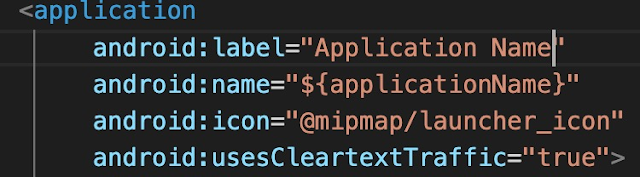
user android:usesCleartextTraffic="true" to run  HTTP sites. not require for  HTTPS websites


Step 3:

Final Code: You can use the following code to run the website under android

import 'package:flutter/material.dart';
import 'package:webview_flutter/webview_flutter.dart';

void main() {
  runApp(
    const MaterialApp(
      home: WebViewApp(),
    ),
  );
}

class WebViewApp extends StatefulWidget {
  const WebViewApp({Key? key}) : super(key: key);

  @override
  State<WebViewApp> createState() => _WebViewAppState();
}

class _WebViewAppState extends State<WebViewApp> {
  @override
  Widget build(BuildContext context) {
    return Scaffold(
      appBar: AppBar(
        title: const Text('Flutter WebView'),
      ),
      body: const WebView(
        initialUrl: 'https://www.stackoverflowtips.com/',
      ),
    );
  }
}

Compile your code and have it run in an emulator:

sample output from code labs. developers. google. com


Bonus Point

You  may face the following issue "Android Webview gives net::ERR_CACHE_MISS message"

You can fix this issue by 

  • go to AndroidManifest.xml
  • add the following configuration
    • <uses-permission android:name="android.permission.INTERNET" />
  • Ensure that you don't have webView.getSettings().setBlockNetworkLoads (false);

09 June, 2022

What is a Non-fungible token?

 What is an NFT?

NFTs, or non-fungible tokens, are cryptographic tokens that exist on a blockchain but cannot be copied, each with its own unique identifying number and metadata.

NFTs are comparable to orators or information tokens, but they are neither interchangeable or fungible like cryptocurrencies like Bitcoin or Ethereum. NFT supporters claim that NFTs provide a public certificate of authenticity or proof of ownership, but the legal rights conveyed by an NFT are uncertain. The request of an NFT, as defined by the blockchain, has no inherent legal meaning and provides no other legal rights over the digital files associated with it.

A Non-fungible Token (NFT) is a digital asset, also known as a cryptographic asset, that has a unique identification code and metadata that distinguishes it from a fungible token. They, like cryptocurrencies, cannot be traded or exchanged at equivalent values. The difference between fungible tokens and cryptos is that cryptos are exactly the same and can thus be used for commercial transactions.

Some Famous and Most Expensive NFT

BORED APE YACHT CLUB

BAYC is a collection of 10,000 Bored Ape NFTs—unique digital collectibles living on the Ethereum blockchain. Your Bored Ape doubles as your Yacht Club membership card, and grants access to members-only benefits, the first of which is access to THE BATHROOM, a collaborative graffiti board. Future areas and perks can be unlocked by the community through roadmap activation.

BAYC Floor Price:  91.5 ETH


CryptoPunks (ΟΎ)

CryptoPunks launched as a fixed set of 10,000 items in mid-2017 and became one of the inspirations for the ERC-721 standard. They have been featured in places like The New York Times, Christie’s of London, Art|Basel Miami, and The PBS NewsHour.

Floor Price: 47.45 ETH , famous nft:


How does NFT work?

NFTs rely on blockchain technology to function. Because of its unique construction, each NFT has the potential to be used in a variety of applications. A digital asset management platform is a great way to represent actual assets like real estate and artwork digitally. Because NFTs are constructed on blockchains, they can also act as identity management systems in addition to removing intermediaries and linking artists to audiences.NFTs can remove intermediaries, make transactions more efficient, and create new markets.

Many crypto-trading enthusiasts and art collectors use NFTs. Additionally, it can be used for digital content, gaming items, investment collateral, and domain names.


TOP 10 NFT as of now dated 10/JUN/2022


if you are interested in crypto try the below link you will get an awesome discount on brokerage 


Use my code for the great deals

Crypto exchanges You Can Join 

Bybit Exchange - referral code: JZBLL2 or   Click to Join

Kucoin Exchange - referral code: rBPQFWD or  Click to Join

Binance Exchange - Code: GW4QZ68E or click here to join Biance