28 June, 2022

Microsoft Graph API upload large file to SharePoint

How to Upload a file to SharePoint using Microsoft Graph API - C#/.Net?


To make it easier to upload large files, a number of entities in Microsoft Graph support plus some extra file uploads. Instead of attempting to upload the entire file in a single request, the file is divided into smaller pieces and a single request is used to upload a single slice. To make this process easier, the Microsoft Graph SDKs include a large file upload task that handles the uploading of the slices.


Azur AD Setup:

 you need to complete the following steps to configure the azure ad.

Step - 1: Register an application with the Microsoft identity platform


  1. Sign in to the Azure portal.

  2. If you have access to multiple tenants, use the Directories + subscriptions filter in the top menu to switch to the tenant in which you want to register the application.

  3. Search for and select Azure Active Directory.

  4. Under Manage, select App registrations > New registration.

  5. Enter a Display Name for your application. Users of your application might see the display name when they use the app, for example during sign-in. You can change the display name at any time and multiple app registrations can share the same name. The app registration's automatically generated Application (client) ID, not its display name, uniquely identifies your app within the identity platform.

  6.  see more here https://docs.microsoft.com/en-us/azure/active-directory/develop/quickstart-register-app

Step 2- Grand required permission to App

One of the following permissions is required to call this API. To learn more, including how to choose permissions, see Permissions.

you must have the below-highlighted permissions granted with Admin Consent 

Permission typePermissions (from least to most privileged)
Delegated (work or school account)Files.ReadWrite, Files.ReadWrite.All, Sites.ReadWrite.All
Delegated (personal Microsoft account)Files.ReadWrite, Files.ReadWrite.All
ApplicationFiles.ReadWrite.All, Sites.ReadWrite.All


Step-3:  Create secrete and save it (make sure to keep it secure)

When receiving tokens at a web addressable location, confidential applications can use credentials to identify themselves to the authentication service (using an HTTPS scheme). We recommend using a certificate (rather than a client secret) as a credential for greater assurance.

Create secrete and save it (make sure to keep it secure)

Step-4:  Get Client Id and Tenant Id

just get it and save it somewhere that will be later used in c# code.

Get Client Id and Tenant Id


C# Code  Setup

Step-1: Need to install the following NuGet pkg

  • Azure.Identity
  • Microsoft.Graph

Need to install the following NuGet pkg

Step-2:  Configuration setup

add the following configuration in the appsettings.json, but replace it with your own values that took in from the azure ad app.

"GraphAPISetting": {
  "ClientId": "d956647c-xxxx-xxxx-843b-56f0c7db967a",
  "ClientSecret": "VVe8Q~6Sk~xxxxxxxxqACB7xzxtZ0NEc2n",
  "TenantId": "33f294fc-00af-423d-XXXX-703cXXXXe3ed" 
}


Step-4: Finally C# code

private ClientCredentialProvider _SetAuthToken()
{

//_config - use microsoft configuration, dependecy injection.

   var _tenantId = _config["GraphAPISetting:TenantId"];
    var _clientId = _config["GraphAPISetting:ClientId"];
    var  _clientSecret = _config["GraphAPISetting:ClientSecret"];
    IConfidentialClientApplication confidentialClientApplication =
ConfidentialClientApplicationBuilder
        .Create(_clientId)
        .WithTenantId(_tenantId)
        .WithClientSecret(_clientSecret)

        .Build();
    return new ClientCredentialProvider(confidentialClientApplication);
}

public async Task<void> Upload()
{
   
    string site = "<YOUR DOMAIN, REPLACE HERE>.sharepoint.com";
    string relativePath = "/sites/<YOUR SITE, REPLACE HERE>";

var   _authProvider = _SetAuthToken();

    GraphServiceClient graphClient = new GraphServiceClient(_authProvider);

    Site s = await graphClient
        .Sites[site]
        .SiteWithPath(relativePath)
        .Request()
        .GetAsync();


    using (var fileStream =
        System
        .IO
        .File
        .OpenRead(
            @"myfile.txt"
        ))
    {
        var uploadSession = await graphClient
            .Sites[s.Id]
            .Drive
            .Root
            .ItemWithPath("sometext-1.txt")
            .CreateUploadSession()
            .Request()
            .PostAsync();

        // Max slice size must be a multiple of 320 KiB
        int maxSliceSize = 320 * 1024;
        var fileUploadTask =
            new LargeFileUploadTask<DriveItem>(uploadSession, fileStream,
maxSliceSize);

        var totalLength = fileStream.Length;
        // Create a callback that is invoked after each slice is uploaded
        IProgress<long> progress = new Progress<long>(prog => { });
        try
        {   // Upload the file
            var uploadResult = await fileUploadTask.UploadAsync(progress);

            //Console.WriteLine(uploadResult.UploadSucceeded ?
            //    $"Upload complete, item ID: {uploadResult.ItemResponse.Id}" :
            //    "Upload failed");
        }
        catch (ServiceException ex)
        {
            //Console.WriteLine($"Error uploading: {ex.ToString()}");
        }
    }
}


Final Output

 you will find that our text has been uploaded successfully.

Final Output


Some useful reference 

https://developer.microsoft.com/en-us/graph/graph-explorer

https://docs.microsoft.com/en-us/graph/api/drive-get?view=graph-rest-1.0&tabs=csharp

23 June, 2022

azure function error unknown argument --port

How to run Azure Function app on a different port in Visual Studio

or 

azure function error unknown argument --port


How to Fix it?

  • Update Project Properties -> Debug to following
  • put the following command  "host start --port 7071 --pause-on-error"


host start --port 7071 --pause-on-error


Finally, it works 


flutter/Android WebView not loading an HTTPS or http URL


flutter/Android WebView not loading an HTTPS or http  URL

flutter/Android WebView not loading an HTTPS or http  URL


You can use the WebView plugin to display a webpage within your Flutter application. A Flutter plugin that provides a WebView widget.

Step 1:

Install web view using the following command 

  •  flutter pub add webview_flutter

Step 2:

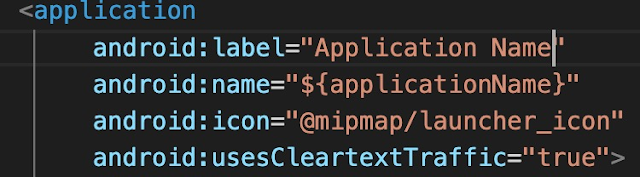
user android:usesCleartextTraffic="true" to run  HTTP sites. not require for  HTTPS websites


Step 3:

Final Code: You can use the following code to run the website under android

import 'package:flutter/material.dart';
import 'package:webview_flutter/webview_flutter.dart';

void main() {
  runApp(
    const MaterialApp(
      home: WebViewApp(),
    ),
  );
}

class WebViewApp extends StatefulWidget {
  const WebViewApp({Key? key}) : super(key: key);

  @override
  State<WebViewApp> createState() => _WebViewAppState();
}

class _WebViewAppState extends State<WebViewApp> {
  @override
  Widget build(BuildContext context) {
    return Scaffold(
      appBar: AppBar(
        title: const Text('Flutter WebView'),
      ),
      body: const WebView(
        initialUrl: 'https://www.stackoverflowtips.com/',
      ),
    );
  }
}

Compile your code and have it run in an emulator:

sample output from code labs. developers. google. com


Bonus Point

You  may face the following issue "Android Webview gives net::ERR_CACHE_MISS message"

You can fix this issue by 

  • go to AndroidManifest.xml
  • add the following configuration
    • <uses-permission android:name="android.permission.INTERNET" />
  • Ensure that you don't have webView.getSettings().setBlockNetworkLoads (false);

09 June, 2022

What is a Non-fungible token?

 What is an NFT?

NFTs, or non-fungible tokens, are cryptographic tokens that exist on a blockchain but cannot be copied, each with its own unique identifying number and metadata.

NFTs are comparable to orators or information tokens, but they are neither interchangeable or fungible like cryptocurrencies like Bitcoin or Ethereum. NFT supporters claim that NFTs provide a public certificate of authenticity or proof of ownership, but the legal rights conveyed by an NFT are uncertain. The request of an NFT, as defined by the blockchain, has no inherent legal meaning and provides no other legal rights over the digital files associated with it.

A Non-fungible Token (NFT) is a digital asset, also known as a cryptographic asset, that has a unique identification code and metadata that distinguishes it from a fungible token. They, like cryptocurrencies, cannot be traded or exchanged at equivalent values. The difference between fungible tokens and cryptos is that cryptos are exactly the same and can thus be used for commercial transactions.

Some Famous and Most Expensive NFT

BORED APE YACHT CLUB

BAYC is a collection of 10,000 Bored Ape NFTs—unique digital collectibles living on the Ethereum blockchain. Your Bored Ape doubles as your Yacht Club membership card, and grants access to members-only benefits, the first of which is access to THE BATHROOM, a collaborative graffiti board. Future areas and perks can be unlocked by the community through roadmap activation.

BAYC Floor Price:  91.5 ETH


CryptoPunks (Ͼ)

CryptoPunks launched as a fixed set of 10,000 items in mid-2017 and became one of the inspirations for the ERC-721 standard. They have been featured in places like The New York Times, Christie’s of London, Art|Basel Miami, and The PBS NewsHour.

Floor Price: 47.45 ETH , famous nft:


How does NFT work?

NFTs rely on blockchain technology to function. Because of its unique construction, each NFT has the potential to be used in a variety of applications. A digital asset management platform is a great way to represent actual assets like real estate and artwork digitally. Because NFTs are constructed on blockchains, they can also act as identity management systems in addition to removing intermediaries and linking artists to audiences.NFTs can remove intermediaries, make transactions more efficient, and create new markets.

Many crypto-trading enthusiasts and art collectors use NFTs. Additionally, it can be used for digital content, gaming items, investment collateral, and domain names.


TOP 10 NFT as of now dated 10/JUN/2022


if you are interested in crypto try the below link you will get an awesome discount on brokerage 


Use my code for the great deals

Crypto exchanges You Can Join 

Bybit Exchange - referral code: JZBLL2 or   Click to Join

Kucoin Exchange - referral code: rBPQFWD or  Click to Join

Binance Exchange - Code: GW4QZ68E or click here to join Biance


30 May, 2022

distributed messaging system and some common messaging scenarios


What is Distributed Messaging System?


Distributed messaging is based on the concept of reliable message queuing. Messages are queued asynchronously between client applications and messaging systems. A distributed messaging system provides the benefits of reliability, scalability, and persistence.

Most of the messaging patterns follow the publish-subscribe model (Pub-Sub) where the senders of the messages are called publishers and those who want to receive the messages are called subscribers.

Once the message has been published by the sender, the subscribers can receive the selected message with the help of a filtering option. 

Type of filtering

  •  topic-based filtering
  •  content-based filtering.

Note that the pub-sub model can communicate only via messages. It is a very loosely coupled architecture; even the senders don’t know who their subscribers are. Many of the message patterns enable with message broker to exchange publish messages for timely access by many subscribers. 

A real-life example is Netflix, amazon prime video, which publishes different channels like sports, movies, music, etc., and anyone can subscribe to their own set of channels and get them whenever their subscribed channels are available.


Some common messaging scenarios are:

Messaging. Transfer business data, such as sales or purchase orders, journals, or inventory movements.

Decouple applications. Improve reliability and scalability of applications and services. Client and service don't have to be online at the same time.

Topics and subscriptions. Enable 1:n relationships between publishers and subscribers.

Message sessions. Implement workflows that require message ordering or message deferral.

Here is an example of Azure Bus Service:


17 May, 2022

Angular-npm ERR cb() never called

 Angular-npm ERR cb() never called

Here is easy steps to solve this problem?

while installing a node package from the package.json file and the package-lock.json file is corrupted due to some reasons like  the node.js version is updated to the latest,  you may see an error like this in our terminal.

Following are the possible solutions to this problem, I trust, you may try one of them will work for you.

Solution 1:

npm config set registry https://registry.npmjs.org/

Solution 2:

npm cache clean

Or

npm cache clean --force

You might also manually remove the node_modules folder and try again in case the command above failed.

If still doesn't work, the global cache might be broken, try running npm cache clean --force and then do a clean install.

Solution 3:

npm install -g npm

Just globally installed the newest version of NPM and my guess Clearing npm cache is optional.


24 April, 2022

Azure Web Application Firewall?


Azure Web Application Firewall?

Azure Web Application Firewall (WAF) on Azure Application Gateway provides centralized protection of your web applications from common exploits and vulnerabilities. Web applications are increasingly targeted by malicious attacks that exploit commonly known vulnerabilities. SQL injection and cross-site scripting are among the most common attacks.

WAF on Application Gateway is based on Core Rule Set (CRS) 3.1, 3.0, or 2.2.9 from the Open Web Application Security Project (OWASP).

What problem it'll solve for your application( Features)?

  • SQL-injection protection.
  • Cross-site scripting protection.
  • Protection against other common web attacks, such as command injection, HTTP request smuggling, HTTP response splitting, and remote file inclusion.
  • Protection against HTTP protocol violations.
  • Protection against HTTP protocol anomalies, such as missing host user-agent and accept headers.
  • Protection against crawlers and scanners.
  • Detection of common application misconfigurations (for example, Apache and IIS).
  • Configurable request size limits with lower and upper bounds.
  • Exclusion lists let you omit certain request attributes from a WAF evaluation. A common example is Active Directory-inserted tokens that are used for authentication or password fields.
  • Create custom rules to suit the specific needs of your applications.
  • Geo-filter traffic to allow or block certain countries/regions from gaining access to your applications.
  • Protect your applications from bots with the bot mitigation ruleset.
  • Inspect JSON and XML in the request body

https://docs.microsoft.com/en-us/azure/web-application-firewall/media/ag-overview/waf1.png

Image Source: https://docs.microsoft.com/en-us/azure/web-application-firewall

Protection

  • Protect your web applications from web vulnerabilities and attacks without modification to back-end code.
  • Protect multiple web applications at the same time. An instance of Application Gateway can host up to 40 websites that are protected by a web application firewall.
  • Create custom WAF policies for different sites behind the same WAF
  • Protect your web applications from malicious bots with the IP Reputation ruleset
  • read more on MSDN